Every USDT and USDC transfer in one ledger, with its type
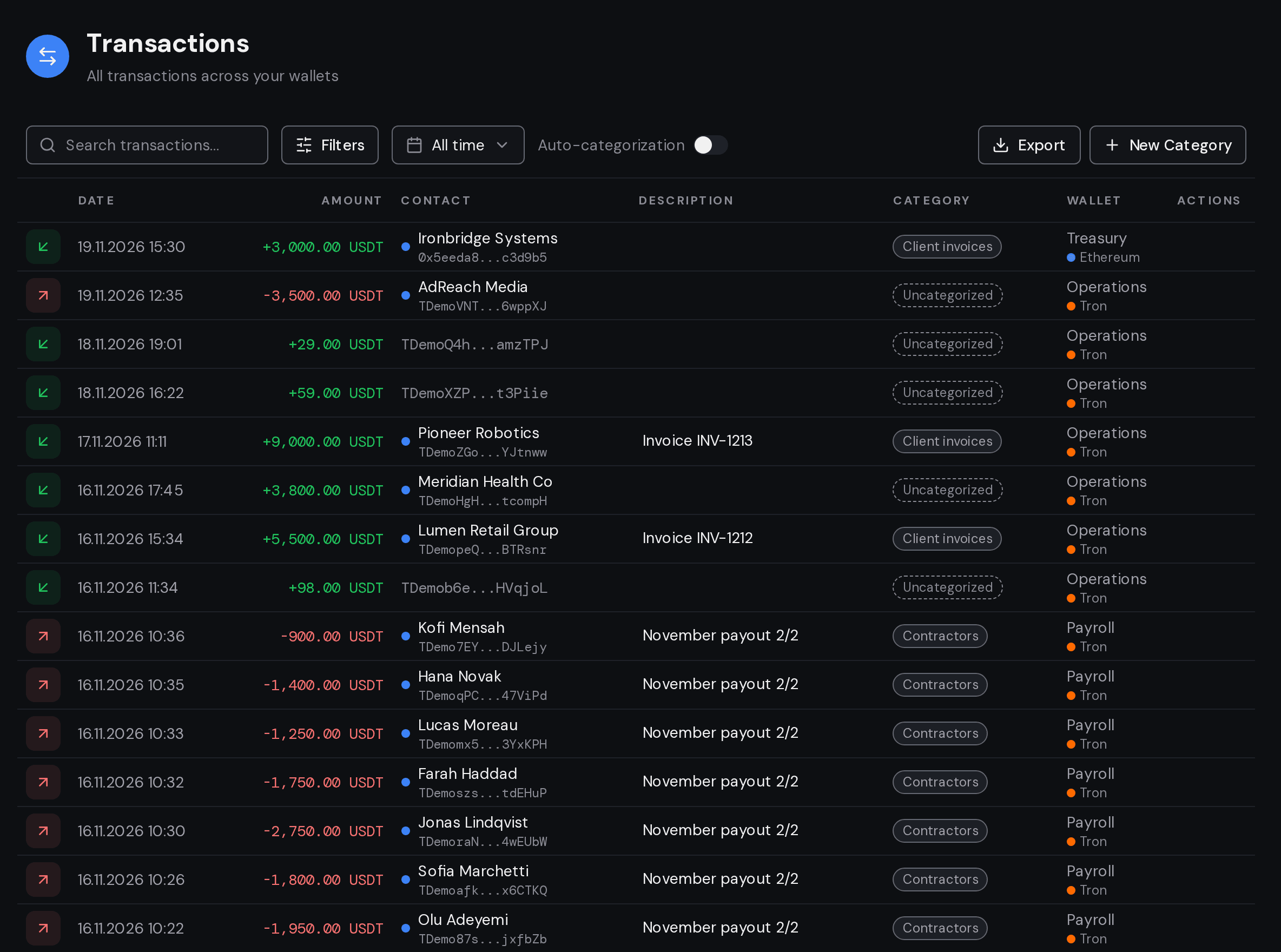
The ledger lists the transfers of your wallets and gives each one a type: income, expense, internal transfer or swap. Search and filters find any of them, and descriptions and categories are edited in the list itself.
How it works
- Step 1
Each transfer gets a type
A transfer in is income and a transfer out an expense, unless both sides are the account's own wallets or the transfer is one leg of a swap.
- Step 2
Find it
Search by description, address, hash, category, contact or amount. Filter by type (Incoming, Outgoing, Internal Transfer and Swap), wallet, contact, category and dates; each type, wallet, contact and category shows how many transfers match it.
- Step 3
Label it
Write a description and pick a category in the row itself.
- Step 4
Open it
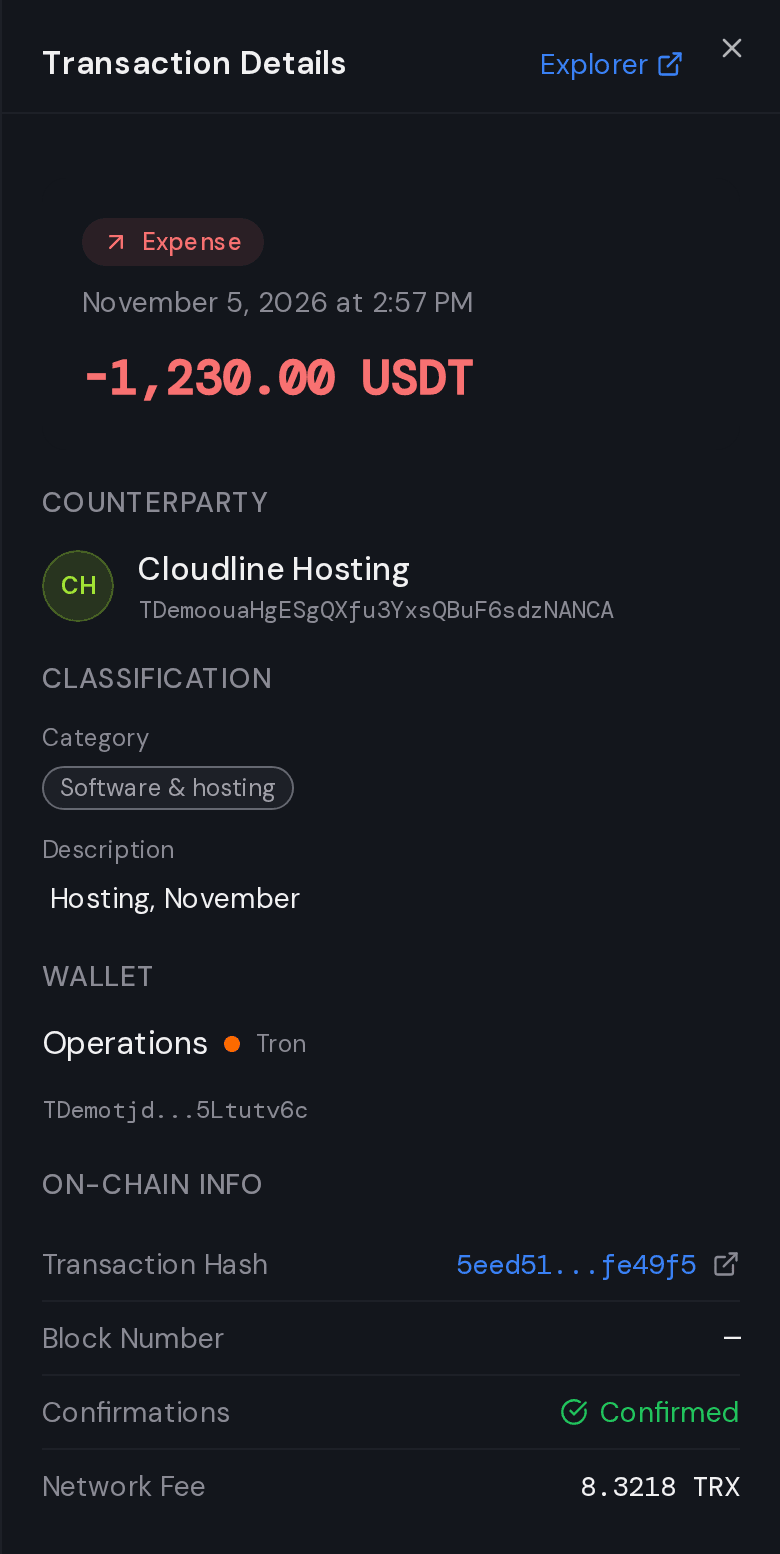
The details show the amount, contact, category, description and wallet, the transaction hash with a link to the explorer, and the network fee.
Limits and formats
| Swaps | When you send USDT or USDC to one of 12 known exchange or bridge contracts and receive USDT or USDC back from one within an hour, both transfers are marked as one swap. A swap into any other token stays an expense. |
|---|---|
| Network fee | In the network's own coin (TRX on TRON and ETH on Ethereum), for a transfer your address sent. A fee appears a few minutes after import. A transfer your address received, or one a spender or relayer sent on its behalf, shows "Paid by another account". |
| Descriptions per plan | Free: 20 transaction descriptions; Pro: Unlimited transaction descriptions, in total, not per month. Descriptions written by people you share a wallet with count against your allowance. |
| Dollar amounts | One USDT or USDC counts as one dollar; nothing is converted at a market rate. |
What it does not do
- No page in the app changes a transaction's type: it follows the rules above.
- Not shown: the fee of a swap in which your address only received tokens, and the fee of a failed transaction.
Questions
Why is a payment between my own wallets not income?
When both addresses belong to the account, the transfer is an internal transfer: it counts as neither income nor spending. The detection can be switched off in Settings.
Can I search by amount?
Yes. Type a number and the ledger finds transfers of exactly that amount, along with descriptions, addresses and hashes that contain it.
Do people I share a wallet with see my descriptions?
Yes. Descriptions and categories belong to the transaction, so everyone with access to the wallet sees them; contact names stay each person's own.
Related pages
- Contacts and categoriesName a counterparty's address once as a contact with a default category. Import and export contacts as CSV.
- Cashflow analyticsIncome, expenses and net cashflow by month, a breakdown by category, and each wallet's balance at the end of every month.
- FreelancersHow a freelancer paid in USDT and USDC uses the Free plan to see income by client and export CSV for a tax adviser.
- Reconcile crypto paymentsHow to reconcile crypto payments: compare the payments you expected with the transfers on the blockchain, match them, and resolve what does not match.